New in Platform
2025.10.22
October 2025
Design Studio
Filtered Interface Selection:
When an interface is being assigned to a link, users can only select the interfaces that are common to the Functionalities that are being connected.
This should significantly help users get successful resolves and select CUBOs.
ML/AI
CELUS Design Assistant
CELUS Design Assistant is here! All AI features are consolidated under a unified, powerful assistant. No more specific pages hosting CUBOt , no more changing the CUBOt mode. All is one place, all accessible from every page to support from project start till the end.
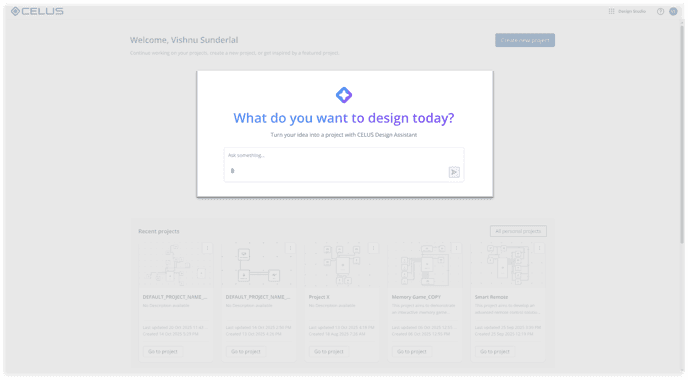
Design Assistant on Welcome Screen
AI-Powered Project Creation: Create complete projects with a single prompt. The Design Assistant automatically generates project names and descriptions when you create projects from the Welcome page using AI prompts.
Seamless Navigation Access: Access the Design Assistant directly from secondary navigation inside any project for instant help wherever you are.
Design Canvas
BOM
Component Alternatives
CUBO Results
Conversational DA: Experience natural, flowing conversations with the Design Assistant. Context is maintained and passed between pages within your active session, ensuring continuity throughout your workflow.
Smart Information Prioritisation: The Design Assistant prioritizes datasheet information over CUBO details, ensuring you get the most accurate and reliable technical specifications.
Component Comparison: Easily compare CUBOs and alternatives with the help of the DA to help you make informed decisions.